
What is MoodRadar
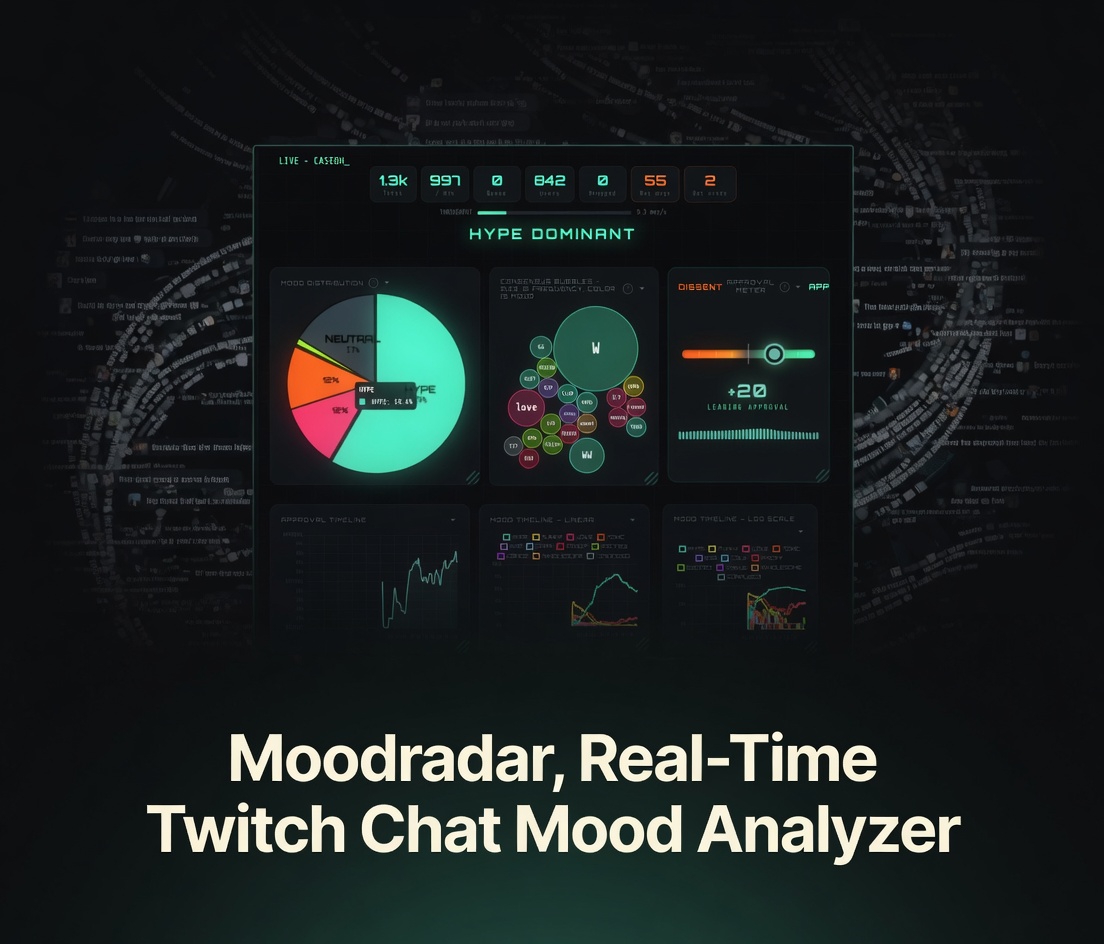
MoodRadar is an experimental, single-file HTML application that turns high-volume Twitch chat into clear, real-time visual insights. Instead of struggling to read thousands of scrolling messages per minute, it instantly shows the overall emotional pulse and consensus of the chat across 11 distinct mood categories.
It lives alongside Ticked inside the github.com/Ranzlappen/ticked repository as a companion tool — no separate repo, no install, no accounts.
How It Works
Enter any Twitch channel name and hit connect. MoodRadar opens a WebSocket connection directly to Twitch’s IRC-over-WebSocket endpoint[4] as an anonymous read-only listener — no OAuth token needed, no Twitch API key required. Every PRIVMSG (chat message) is received, parsed, and fed through a client-side keyword-and-pattern based sentiment classifier that maps it to one or more of 11 mood labels.
All of this happens in your browser. No proxy, no backend, no data ever leaves the page.
Architecture & Technical Design
MoodRadar is a zero-dependency, single HTML file — the same architectural philosophy as Ticked. The full implementation is self-contained in moodradar.html[1]:
- Transport — Twitch’s anonymous IRC over WebSocket (
wss://irc-ws.chat.twitch.tv:443[4]). The client sends a NICK/PASS of the formjustinfan<random>(Twitch’s convention for anonymous read-only connections) and issues aJOIN #<channel>command. No OAuth, no Twitch Developer credentials required. - Message ingestion — A ring-buffer / queue absorbs burst traffic. The dashboard metric panel shows queue depth, dropped messages (when the classifier falls behind), and message rate (msg/s) in real time.
- Sentiment classifier — A lightweight, in-browser keyword and emoji pattern matcher that maps each chat message to one of 11 emotions: Hype, Funny, Love, Toxic, Sad, Calm, Angry, Cringe, Wholesome, Confused, Neutral. No external NLP library is loaded — all logic is embedded in the file.
- Visualizations — All charts and panels are rendered with vanilla Canvas/DOM. There is no Chart.js, D3, or other charting dependency. Timelines support both linear and log10 scale for handling the large dynamic range of message volumes common in big streams.
- Bot detection — A heuristic layer flags likely bot messages (repetitive patterns, known bot name prefixes) and surfaces bot activity as a separate dashboard metric rather than counting bot spam towards the mood scores.
Core Features
- Mood Distribution — Real-time breakdown across 11 emotions: Hype, Funny, Love, Toxic, Sad, Calm, Angry, Cringe, Wholesome, Confused, Neutral.
- Consensus Bubbles — Bubble size shows frequency; bubble color reflects the dominant mood for that cluster of messages.
- Keyword Web — Top terms and phrases currently trending in chat, updated continuously.
- Approval Meter & Dissent — Instant gauge of positive vs. negative sentiment ratio.
- Mood Timelines — Linear and log-scale views of how the chat mood evolves over time.
- Live Feed & Standout Messages — Adjustable live message view with message highlights for unusual or high-signal posts.
- Dashboard Metrics — Total messages, rate (msg/s), queue depth, dropped count, bot activity percentage, and unique user count.
- Customizable Settings — Max timeline points, update interval, label sizes, and quick preset configurations for different stream sizes.


Dashboard Panels at a Glance
| Panel | What it shows |
|---|---|
| Mood Distribution | Live bar/pie breakdown across all 11 mood labels |
| Consensus Bubbles | Clustered bubbles: size = frequency, color = dominant mood |
| Keyword Web | Real-time top n-grams and phrases trending in chat |
| Approval Meter | Positive/negative ratio gauge with dissent indicator |
| Mood Timeline (linear) | Time-series line chart of mood evolution |
| Mood Timeline (log10) | Same data on a logarithmic scale — useful for large volume swings |
| Live Feed | Scrolling message feed with mood-colour highlights |
| Standout Messages | High-signal messages singled out by the classifier |
| Metrics Bar | msg/s, queue, dropped, bots %, unique users, total messages |
High-Throughput Use Cases
MoodRadar was built specifically for high-throughput streams where chat volume makes it impossible to keep up manually. In large gaming broadcasts, major announcements, esports events, or viral moments, messages can arrive at hundreds or even thousands per minute — far beyond any human reader’s capacity.
The tool captures the general chat demeanor instantly — letting streamers, moderators, and viewers know whether the room is hyped, laughing, getting toxic, feeling wholesome, or confused — without reading every line.
Practical scenarios include:
- Monitoring audience reaction during boss fights, giveaways, or key story moments in a gaming stream.
- Helping moderators detect rising negativity or toxic cluster-spikes before they escalate.
- Giving content creators real-time feedback on audience tone during live segments.
- Researching collective behaviour in fast-moving communities for academic or journalistic purposes.
Settings & Configuration
MoodRadar’s settings panel (accessible from the dashboard) exposes several tuneable parameters for adapting it to different stream sizes:
- Max timeline points — Controls how many time-steps are retained in the mood timeline charts. Increase for long sessions; reduce on slower machines.
- Update interval — How frequently (in milliseconds) the visualizations are redrawn. A longer interval reduces CPU load on very high-volume streams.
- Label sizes — Adjust the keyword web and consensus bubble font sizes for readability on different display sizes.
- Quick presets — One-click configuration bundles tuned for small (< 100 msg/s), medium, and large (> 1 000 msg/s) streams.
No persistent configuration is saved between sessions — settings reset when you reload the page. Twitch channel connection is also session-only.
Live Demo & Video
Try the current version instantly at ticked.ranzlappen.com/moodradar.html — just type a Twitch channel name and click Connect.
Here is a short screencap demonstration of MoodRadar in action on a live Twitch stream:
Privacy Notes
MoodRadar is a read-only, anonymous listener. It does not write to Twitch chat, does not authenticate on your behalf, and does not store message history anywhere — all data lives only in the page’s JavaScript memory for the duration of the session. Closing or reloading the tab clears everything.
The anonymous justinfan connection method is officially documented by Twitch[4] and is the standard approach for read-only IRC clients. It does not require a Twitch account or any credentials from the user.
Early Development Status
MoodRadar is still in an early experimental stage. Core functionality works reliably for moderate-to-high chat volumes, but occasional bugs, performance variations on very high-throughput streams, or incomplete features may appear. It is under active development.
Known limitations at this stage:
- The sentiment classifier is keyword and pattern based — it can misread sarcasm, stream-specific emote meaning, or heavily emote-only messages.
- Very high-throughput streams (> 2 000 msg/s during peak moments) may produce visible lag in timeline redraws on lower-powered devices.
- Settings do not persist between sessions.
Key Takeaways
- Real-time client-side analysis of live Twitch chat sentiment and consensus — no accounts, no servers, no API keys required.
- Connects via Twitch’s standard anonymous IRC-over-WebSocket protocol[4] — no OAuth needed.
- Multiple intuitive visualizations across 11 mood labels, designed for high-volume, fast-moving chats.
- Zero-dependency single HTML file — the same privacy-first, lightweight architecture as Ticked.
- Early-stage experimental tool with strong potential for streamers, moderators, and community researchers.
Conclusion
MoodRadar delivers an immediate, visual understanding of Twitch chat mood when traditional reading becomes impossible. For streamers dealing with high-throughput environments or viewers who want to feel the room’s pulse without drowning in messages, it offers a lightweight, privacy-first solution.
As an early-stage project it already provides usable value, and continued development will only make it sharper. Test it on your favourite high-energy stream and see the chat’s true demeanour at a glance.
More project showcases: Ticked · Discord Music Bot · Flipper Zero Framework · HardwareDash · Synth Piano · tools.ranzlappen.com
Sources
- Ranzlappen/ticked — GitHub repository (source for MoodRadar and Ticked).
- MoodRadar — live app at ticked.ranzlappen.com/moodradar.html.
- MoodRadar Demo Video (YouTube Short).
- Twitch Developer Documentation — Twitch IRC (Chat) reference, including anonymous read-only connections via justinfan credentials.
Comments
Comments are powered by Giscus (GitHub Discussions).
Enable functional cookies to load comments.